Monitoring & Alerting
46 monitor types across web, network, mail, infrastructure and cloud, plus any Nagios plugin, with incidents that manage themselves.
Your monitors at a glance
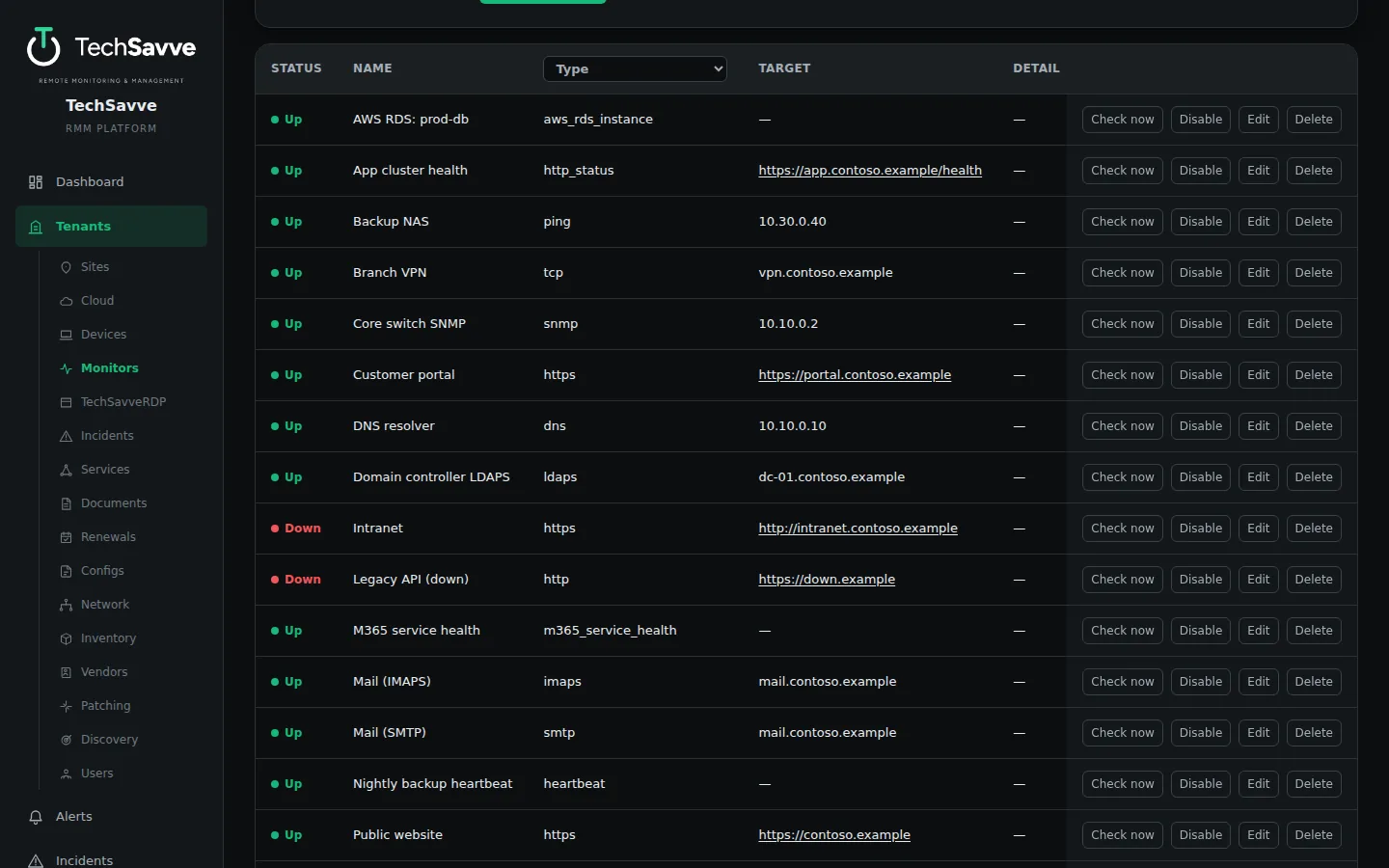
Watch everything that matters
Web / HTTP
HTTP and HTTPS availability, status codes, keyword matching, JSON checks, header checks, response time and SSL certificate expiry.
Network
Ping, TCP ports, DNS and DNS-record checks, DNS blocklists, NTP, SNMP and domain-expiry monitoring.
SMTP, IMAP and POP3, with or without implicit TLS.
Infrastructure
SSH, SFTP, RDP, SMB, LDAP and LDAPS, PostgreSQL, MySQL, SQL Server, MongoDB and Redis.
Cloud
AWS CloudWatch alarms, EC2 and RDS instances. Azure resource health and Azure Monitor metrics. Microsoft 365 service health.
Heartbeats
Push-style monitors that alert when a scheduled job or system stops checking in.
Nagios plugins
Already rely on Nagios checks? Install the standard plugins, or your own, next to the site collector and run them by name. OK, WARNING and CRITICAL map onto TechSavve’s alerts, and the performance data each plugin prints is graphed.
Virtual machines
VMware host and VM status checks, and whole vCenter, ESXi, Hyper-V, Proxmox and KVM estates read in one go. See Virtualization & Cloud.
From failure to incident, automatically
A single failed check is noise. TechSavve waits for consecutive failures past a threshold you control before it opens one incident and one alert, so your team is not buried in duplicates.
- Alerts are de-duplicated and escalated by severity
- Incidents automatically create a ticket
- Recovery resolves the alert and closes the incident
- Devices that miss their check-in window are marked stale
Device health, from the collector
Resource thresholds
CPU, memory, system and data disks (each with its own limits), ping latency, packet loss, bandwidth, disk I/O latency, CPU temperature and power-supply status where the hardware reports them. Every one has warning and critical levels and a sustained-duration window, so a brief spike does not page anyone.
Fewer, smarter alerts
When a device goes down, its other sensor alerts are acknowledged automatically, so one outage is one incident instead of forty. They are checked again the moment the device returns.
The platform watches itself
Collectors that go quiet and devices that start failing together are noticed and explained, not left as a pile of unrelated alerts.
Watched Windows services
Choose the services that matter on a Windows device and how serious it is when one stops. A stopped service raises an alert, and auto-remediation can run your approved script to start it again.
Unreachable, not down
Tell TechSavve which switch, firewall or host a device is reached through. While that parent is down, the devices behind it show as Unreachable and open no incidents of their own, so one dead switch is one page. Virtual machines are linked to their hosts automatically.
Early warnings, before anything breaks
TechSavve works out what is heading for trouble from the readings, logs and backup status it already collects. Each warning shows its evidence on a chart, says how sure it is, and can be rated or snoozed. They are advice, never alarms: nothing pages anyone and no ticket opens by itself. You choose how long raw readings, daily summaries and status history are kept.
Disk filling up
A disk that will be full in about three weeks, worked out from its trend, with cleanups and one-off jumps not mistaken for a trend.
Memory climbing
Memory that keeps growing without coming back down, the signature of a leak.
Restarts and drop-outs
A device that restarts on its own, or keeps dropping out and coming back.
Devices failing together
Several devices starting to fail at once, which usually points at the network or the collector, not the devices themselves.
Unusual for this time
Readings that are out of character for that device at that time of day, judged against its own history.
Sign-in guessing
Failed sign-ins arriving from the internet, and a sign-in that succeeds right after guessing. See Security.
Disks and RAID
A disk reporting pending or reallocated sectors, heavy wear or a high temperature, and a RAID array that has lost a member, read from each disk’s own health report on Windows, Linux and Synology devices. A device that cannot report says Not reported, never healthy.
Telltale log entries
Counts, never message text: out-of-memory kills, disk and hardware errors, restarts without a clean shutdown, and a source that has started reporting errors it never did before. Read from the Windows event logs and the Linux system journal, with known noise such as failed Store-app updates left out.
Backups that stopped
A backup that has not run when it should, or whose last run failed. TechSavve reads Synology Hyper Backup status directly and watches any other job that checks in with a heartbeat. A machine that only syncs to the cloud is labelled that way, not as backed up.
One problem, one incident
When a network change, a bad update or a failing link takes down many devices at once, you should get one page about the cause, not eight about the symptoms.
One cause, one incident
When several devices behind one collector fail the same way at the same time, TechSavve opens one incident, one ticket and one page for the shared cause instead of one each. The devices stay listed on it, and everything closes together when the cause clears.
A single device is still its own incident
A device that fails alone, or in a way the others do not, gets its own incident exactly as before. Grouping needs at least three devices, and at least half of that collector’s devices, failing the same way. It can be switched off.
Starts from the cause
The incident names the error the devices share and shows when each one started failing, so a technician begins with the cause rather than the symptoms.
Updates that watch themselves
A collector update that breaks monitoring is worse than no update. TechSavve treats every update as something to be checked.
Checked, then put back if needed
For the first hour after a collector updates itself, TechSavve compares how its devices were collected before and after. If collection gets worse, the previous version is put back automatically, that version is held so it is not offered again, and every administrator is emailed what happened. A collector also puts its own previous build back if the new one cannot complete a cycle.
Try it on a few first
Mark some collectors as canaries. A new version goes to them first, and to the rest only after the canaries have run it for a day and been judged healthy. You can also hold a version before it goes anywhere.
Quiet while it is checked
While an update is being checked, devices that start failing together do not open incidents or tickets. If the update is put back and they recover, nothing was ever opened.
Maintenance windows
Planned work should not page anyone. Schedule a window once or weekly for a whole customer or any mix of sites, devices and monitors. While it is open, new alerts for what it covers are recorded but acknowledged by the system, so no incident, ticket or page opens. When it ends, anything still wrong comes back on its own.
Start one in a click
Technicians can start a short window from a device page, or on many devices at once from the Devices list.
Nothing is hidden
Alerts and devices show an In maintenance badge, monitoring carries on, and an incident that was already open is never touched.
Patching plays along
A patch run that may restart a device opens its own window, so the restart does not page anyone.
Graphs for everything you measure
Performance Graphs
Every reading TechSavve collects, charted: CPU, memory, disks, latency, traffic and temperature for devices, response times for monitors, and the performance data Nagios plugins print. Pick any period from the last four hours to the last 30 days.
Graph Explorer
Put several hosts on one chart to compare them, see which alerts fire most often, and see how long each host and service was down or out of touch.
Business services, not just boxes
Your customers do not care that a server is down. They care that email or the website is. Describe each service and what it depends on, and TechSavve tells you how the service itself is doing.
Up, degraded or down
A service’s state comes from the devices and monitors it depends on. Redundancy is understood: two web servers out of three still means the website is up, just degraded.
Its own history
Every service keeps its own availability history, so you can show a customer how their email did this month, not how a server did.
Alert on the service
Optionally open an incident when a service goes down or degraded, through the same tickets, on-call and maintenance windows as everything else. One board shows the services of every customer.
See TechSavve RMM in action
Book a free demo with the DFWTechPros team.